
Top 7 Best Mail Apps in 2026
So you’ve got your business email addresses running, but you wonder what are the best mail apps to use them on?
Well, stop searching and get yourself comfy. In this post we have selected for you what we think are the top 7 best mail apps in the galaxy. Let’s bring the big guns!

1. Gmail: King of the Free World
Platforms: Web | Android | iOS
Pretty sure you’ve heard about that one already. Gmail is not just one of the most used mail apps, it’s also continuously one of the best.
Of course, most people use it with their @gmail.com address. But Gmail actually supports external addresses as well. You can use it with any email address really. To see how, have a look at our post How to Use Your Domain Email Address on Free Gmail.

Gmail exists either as a webmail on any browser, or as mobile apps on iOS and Android. Both versions are excellent and extremely responsive.
The web version allows a lot of personalization, intelligently classifies emails into pre-made categories, has a never equaled email writing popover, a powerful email reading interface, an efficient search bar, and a super strong spam protection.
The mobile versions retain most of these qualities while keeping clean, fast, and easy to use.
Since Gmail is available on any web browser, virtually any device can use it. And best of all: it’s completely free! You simply can’t go wrong with Gmail.
2. Spark: Rising Star
Platforms: Windows | macOS | Android | iOS
Spark is a fantastic mail app available on Windows, macOS, Android, and iOS.
The app is incredibly straightforward and easy to use. Its user interface is both clean and fluid.

One of the cornerstones of Spark is team features, with abilities like sharing inboxes, drafts, conversations, and so on. This is obviously great for teams, but even ignoring these features Spark is still one of the best mail apps out there.
Another neat feature is the switch between “classic” and “smart” inbox, the latter being a mode in which your emails get automatically sorted by type and importance (newsletters, notifications, …).
Last but not least, Spark comes in a free version covering most people’s needs, including unlimited email accounts. Paid plans add more AI features and better team features.
If you’re not sure which app to use, Spark won’t disappoint.
3. Canary Mail: Cool Features
Platforms: Windows | macOS | Android | iOS
Canary Mail is a more recent contender having both a very sleek look and advanced email features, not to mention a responsive app.

It is quickly obvious from its features that Canary Mail is extremely serious about security, and strives to give users as much power as possible over their mailbox.
Some of its notable feats are: email receipts, snooze option, easy unsubscribe, sent emails expiry and revocation, newsletter management, phishing protection, and end-to-end encryption via PGP.
All this while complying with multiple contingent standards like HIPAA and GDPR. Impressive!
Canary Mail recently introduced AI features as well, to help draft and summarize emails.
Importantly, Canary Mail is available on all devices, though not on the web. And the app exists in a free version with unlimited mail accounts on up to 2 devices, which unfortunately doesn’t include PGP, AI features, or phishing protection.
4. Edison Mail: Solid Bet
Platforms: macOS | Android | iOS
Edison Mail is a popular mail client, with 4.5/5 stars over more than 150k reviews on the Play Store, and 70k on the App Store.
Here again the presentation is clean and straightforward, you won’t get lost. The design is neat and the app is very responsive.

Edison Mail focuses on email presentation, outlining important information like flight schedule and order delivery, while keeping the inbox clean with things like suggested unsubscribes.
The base app is free and doesn’t have any limitation per se, which is very welcome. However, it’s possible to upgrade the app to Edison Mail+ to access more features such as advanced spam filtering or the interesting LinkedIn email discovery tool.
5. eM Client: Familiar but Modern
Platforms: Windows | macOS | Android | iOS
eM Client is what many are looking for: a familiar yet modern email client.
The app has a pretty standard but well organized layout, similar in part to Gmail. While not revolutionary, the design is definitely modern.
With eM Client, everything is very clear from the get-go. You’ll instantly be comfortable with that app, no learning curve needed.

All the basic features you can expect are there (contacts, calendar, …), and some more (notes, chat, mass mailing, …).
Not everything is available in the free version though, which is also limited to two email addresses only. The pricing model is appreciable though, with a one-time payment option instead of the more common per address cost. Well played!
eM Client also has free iOS and Android apps, but it is not available on the web.
6. BlueMail: Well-Established Contender
Platforms: Windows | macOS | Linux | Android | iOS
BlueMail is one of the largest “alternative” mail apps out there (i.e. not Gmail, Outlook or Thunderbird).
It started back in 2013 and has since grown to a large user base. Its reviews are numerous and usually excellent.

BlueMail often boasts about its user interface. However, while decent, that’s not its best feature in our opinion. The best one is that it runs on every device.
There is a BlueMail app for Windows, macOS, Android, iOS, and even Linux (rare enough to note). This is no small feat, and means pretty much anybody can use BlueMail.
Another big win is that BlueMail has a fully fledged free version including all the basics (calendar, contacts, …). The paid versions are more targeted to corporate needs like policy control and integrated video conferencing.
7. Mailbird: Make It Yours
Platforms: Windows | macOS
You may have heard of Mailbird, a neat mail client with excellent look customization options: nine color themes and five layouts, in light or dark mode.

Long available on Windows only, it now runs on macOS as well, and a single license covers both.
Mailbird also brings useful extras like a unified inbox, snooze and scheduled send, and 45+ apps you can add to a side panel next to your mail.
It now comes with a free plan for one email account, though these extras require a paid plan, available as a yearly subscription or a one-time payment.
Honorable Mentions
Some popular or interesting email apps, did not make the list. Let’s outline a few of them here and explain why.
Outlook
Platforms: Web | Windows | macOS | Android | iOS
No need to present Outlook. One of the earliest mail clients on Windows, it has evolved over the years to a more modern app on all major platforms excluding Linux.
The Android and iOS apps are hugely popular.

Despite this popularity and the undeniable quality of the app, in our experience Outlook has been plagued with a lot of bugs and issues often damaging the user experience with many frustrations.
Granted, things tend to go in the right direction, but the evolution is painfully slow, and contacting Microsoft to get answers is incredibly difficult if not impossible.
For those reasons, we chose not to include Outlook. That’s our position, but if that app fits you well, no need to change!
Thunderbird
Platforms: Windows | macOS | Linux | Android
One of the first free and solid alternatives to Outlook back in the day, Thunderbird is still one of the best-known email clients, with a large community to support its development.
Thunderbird works well, has a ton of plugins, and is available on Windows, Mac, Linux and Android.

While there is nothing wrong with it per se, the lack of an iOS app and the somewhat dated user interface in comparison to newer products led us to exclude it from our list. Still a solid app for old-fashioned desktop use though!
Aqua Mail
Platforms: Android | iOS
Aqua Mail is a mail client with a good track record of user satisfaction, a rich set of features, and a decent free version.

Unfortunately it is mainly a mobile app, and therefore only classifies as an honorable mention in our list.
Spike
Platforms: Web | Windows | macOS | Android | iOS
Spike is an outsider with a bold approach: make emails look like chat.
The app definitely succeeds in that goal, sporting a minimalist look, with a clean and lightweight interface.

Many people appreciate the app’s modern style.
Another interesting focus of the service is on group conversations and team chat, complete with tools like notes and tasks.
Spike offers a free plan for 1 email address and 1GB in notes and tasks, with search limited to the last 60 days.
Its chat-like approach won’t suit everyone though, which is why it only classifies as an honorable mention in our list.
Sickle
Platforms: macOS
Sickle is a native Mac mail client that works with any IMAP mailbox, with no cap on accounts. It also runs an MCP server, so AI agents like Claude or Cursor can search, read, and organize mail across all your accounts.
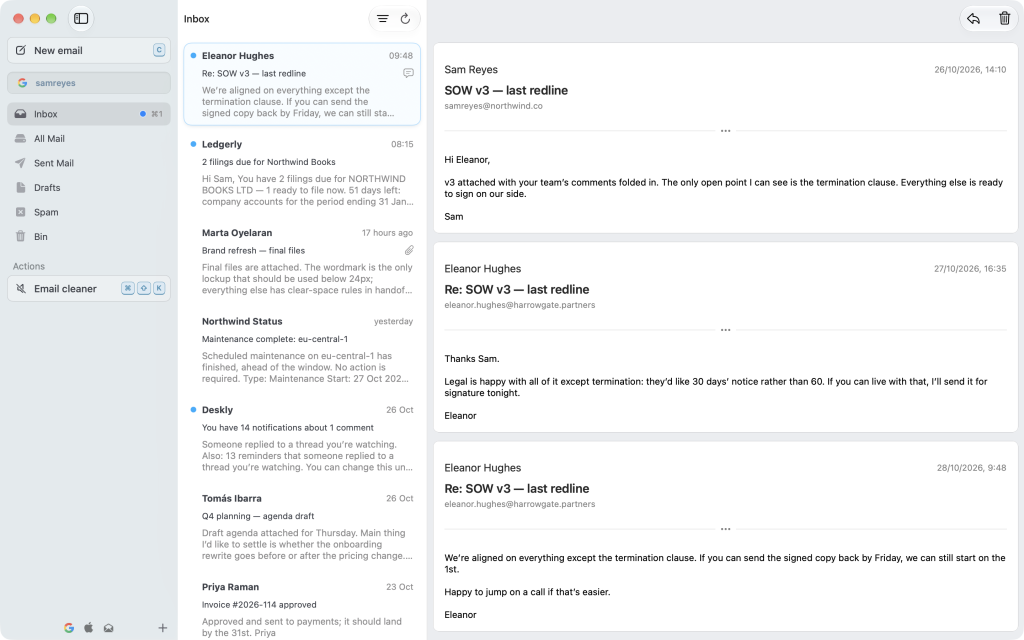
It is a paid app, with a 7-day free trial. It only classifies as an honorable mention because it is limited to macOS and still fairly new.
Clean Email
Platforms: Web | macOS | Android | iOS
Clean Email is a bit special. It’s a great app to clean your inbox, as its name suggests.

However we cannot really classify it as an email client since you cannot send emails with it. The free version is also limited to moving/renaming/deleting 1000 emails only.
What Do You Think
What do you think of this top list of the best email clients? Do you disagree with it? Would you have included other apps? What app are you using? Let us know!
Related Posts
-

How to Create a Business Email Address for Free in 3 Easy Steps
Have you been trying to create a domain email address and find the process cumbersome and/or the service unreliable? Have you had difficulties doing it for free or at a low cost while still having all the basic features anyone needs like the ability to use any mail app? Well, you’re not alone! I have…
-

How to Use Your Domain Email Address on Free Gmail
Gmail is a fantastic mail client, with a powerful UI and a ton of options. A lot of people use it not only for their @gmail.com address, but also for their professional email address, completely for free. No paid Google Workspace account needed. Don’t have a business email address yet? This guide assumes you already…